Collision-free Object Manipulation
Overview
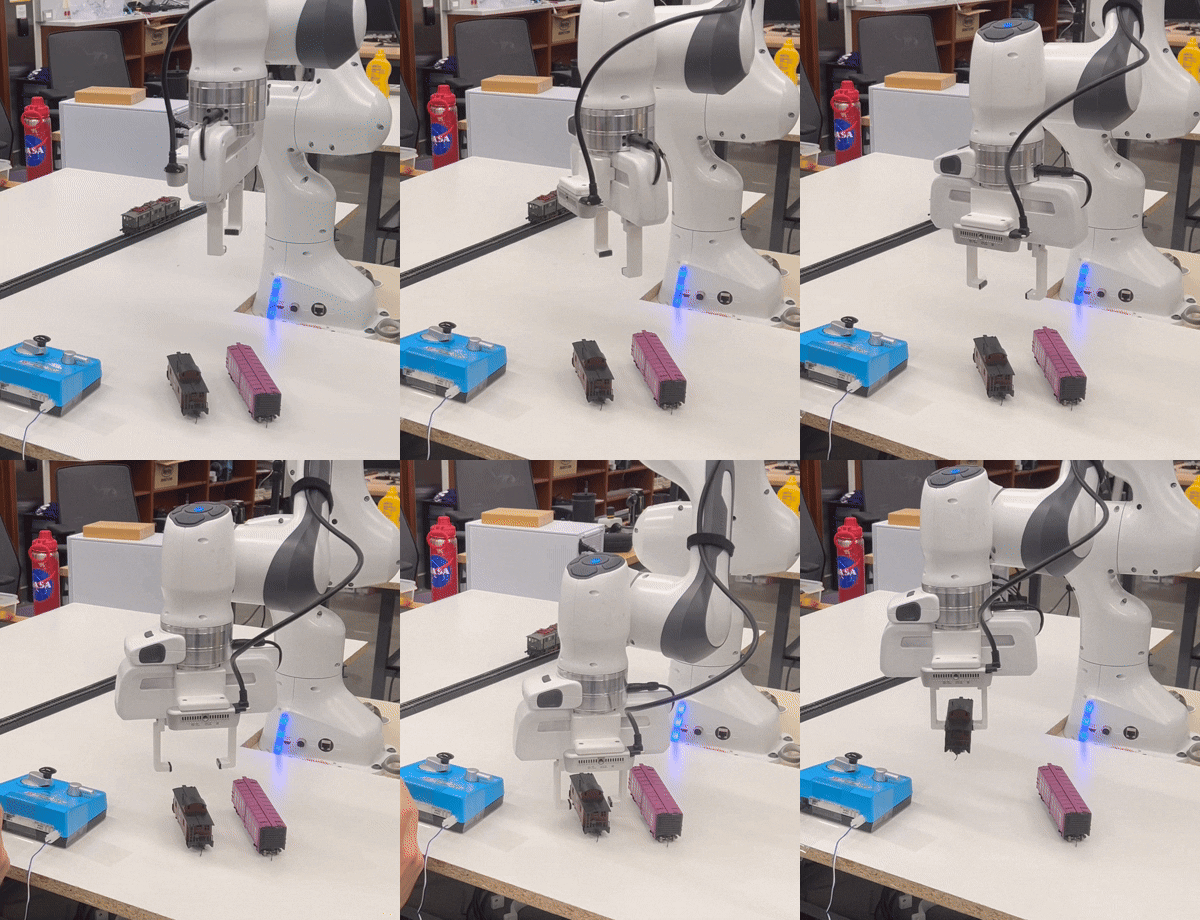
Our team built a system for placing HO scale model trains onto a bachman track using a 7 dof Franka robot arm. Our team consisted of Theo Coulson, Andnet DeBoer, and myself. This system utilizes a custom Python ROS2 API for the motion planning, robot state, and planning scene aspects of controlling the Franka robot arm. A custom package called franka_express uses OpenCV and YOLO for detection of the train cars, track, and track control switch. The package also contains a service call that runs the entire loop to create the planning scene, detect all relevant objects, pick and place each train car, and operate the control switch to run the train cars alongside a locomotive. The Franka arm was outfitted with custom grippers for use in fine maipulation of the train bogies, which require accuracy to within 1 millimeter in order to be properly placed onto the track. My primary contribution was to the motion planning of the arm with ROS2, using OpenCV and YOLO bounding boxes to determine the positions of the objects and the appropriate motions to pick, place, and align the train cars and their bogies with the track.
Subsystems
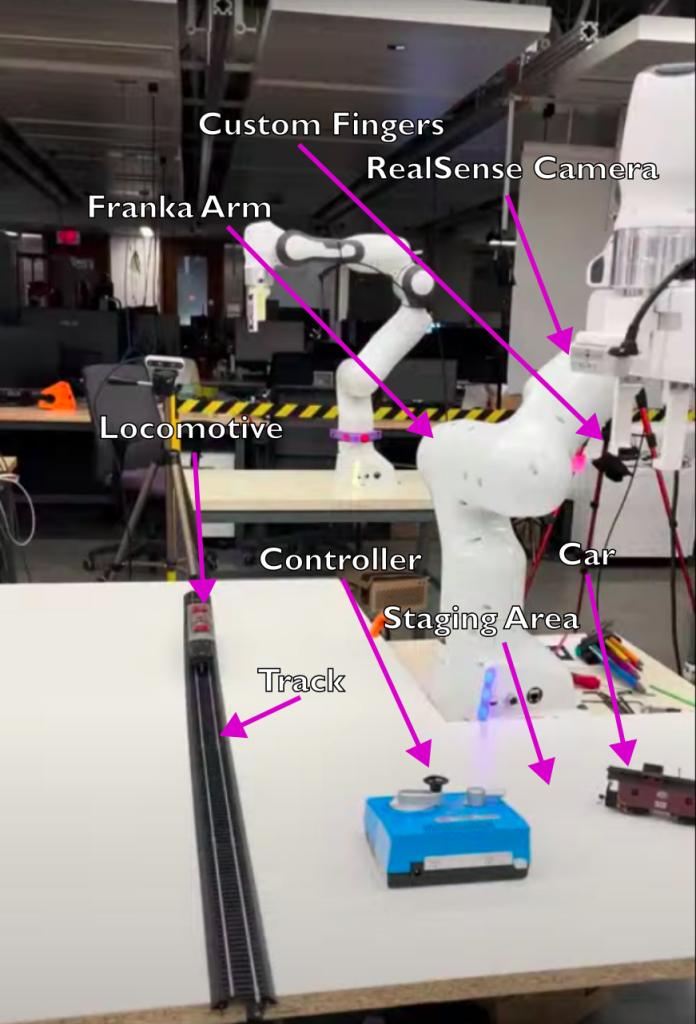
Planning scene setup.
MoveIt API
The first part of the project to be completed was the development of the Python MoveIt API. Using the existing ROS2 Moveit library, the team developed user friendly functions that allowed the user to easily plan a path to a specific pose or move in a Cartesian path between poses. Our team also implimented functionality for loading a planning scene from a yaml file, dynamically adding/removing collision objects to the planning scene, and tracking the robot state. Add a short gif here of the Rviz simulation working to show off planning scene.
Hardware
Custom Grippers
To effectively grip the bogies of the train for proper track alignment, our team created a set of custom grippers that could be mounted to the stock Franka end effector. The grippers were designed in Onshape and 3d printed in PLA. A thin foam layer was added as a final adjustment to allow firm grip without deforming the grippers.
Intel RealSense D450
The RealSense was selected for its ability to provide reasonably accurate depth information and its native compatibility with ROS2.
Model Train Cars
The locomotive was a Piko DB class 191. Our test cars for railing were a Lionel NYC caboose and a 40ft reefer of unknown make. Our track was steel Bachmann E-Z track. The controller was a Kato analog controller.
Vision
Our team designed the vision system to identify the trains, track, and any other aspects of the planning scene using a single Intel RealSense mounted to the end effector. To identify the various elements of the scene, a YOLO model was trained on sections of Bachmann track, two model trains, the model locomotive, and the control switch box. To gather the necessary training data, we took videos using the Franka-mounted RealSense.
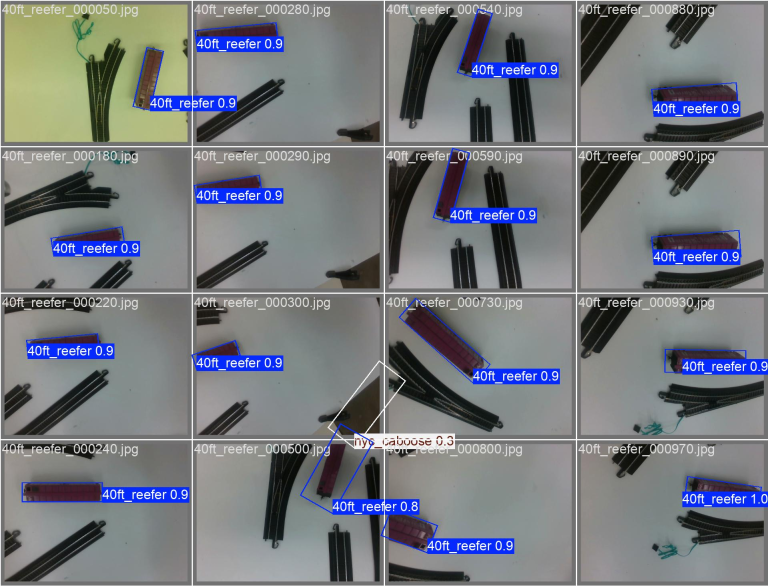
Training images used for the YOLO model.
We then used Grounding Dino and Meta’s SAM 2 to produce approximate bounding boxes from text descriptions of each car. Camera calibration was done with an Aruco marker to determine the distance/orientation of the camera relative to the table. The YOLO model outputs a Pytorch Tensor containing all data related to the minimum bounding boxes of the various elements in its immediate field of view. Our system extracts the corners of the bounding box and calculates the center pixel and orientation of the object. The system subscribes to two seperate vision topics to get the RGB and depth pixels of each object and uses the data from a seperate camera info topic to convert the pixel data to distances in meters in the planning scene.
System Flow
Once the custom service is called, the Franka arm returns to its home pose. It then runs a custom scan function to identify all objects in the RealSense’s field of vision. This function creates a dictionary of each detected object, runs until each object has 50 poses, then averages the results to ensure an accurate position, depth, and orientation relative to the camera. The robot proceeds to a position such that the locomotive is the only object in frame and runs this scan function again to achieve even more precise measurements of its position. This is done again for the track section on which the train cars will be placed. This core loop of move, scan, and average is performed again on the train cars in the staging area. The robot arm then selects each car in order and moves them to align with the track position. Once the car has been placed on the track, the grippers move to the front bogies to pinch and lift them slgihtly above the track. This is done again for the back bogies on each car. The reason for this is to align the bogies with the track position so the car will glide freely on the rails, this is necessary as the bogies will freely rotate while the train is being lifted by the robot and, if improperly aligned, the train will not be able to move along the track.
Personal contributions
My personal contributions are as follows:
- Development and testing of the planning scene package in the MoveIt API.
- Development of various functions to calulate the distance, depth, and orientation of objects in the scene using data from the RealSense camera and Pytorch Tensors from the YOLO model.
- Development and testing the motion planning of identification and placing of the train cars.
Background
The system was developed as part of a group final project for Northwestern University’s Mechanical Engineering 450: Embedded Systems in Robotics.